In this guide
You're usually not getting interviews for one of a few fixable reasons: the employer's software can't read your file, a screening question knocked you out, your resume doesn't show the job's must-haves in the job's own words, or your bullets list duties instead of results. Some silence is just the market: across Ashby's customers, only 3.6% to 4.7% of applications led to an interview in early 2026. Work through the checks below in order, because the first ones take minutes and rule out problems that sink every application you send.
The short version
- Most ATSs don't reject you on a score. Knockout questions, a recruiter's keyword search and a quick human skim are the real filters.
- Check the file first. If the text comes out scrambled or empty, every other fix is wasted on that file.
- Then check fit: the posting's hard requirements, the words it uses, and whether your bullets prove results.
- Silence in the first two weeks means very little. Follow up once, track your reply rate and change one thing at a time.
The checklist check in this order.
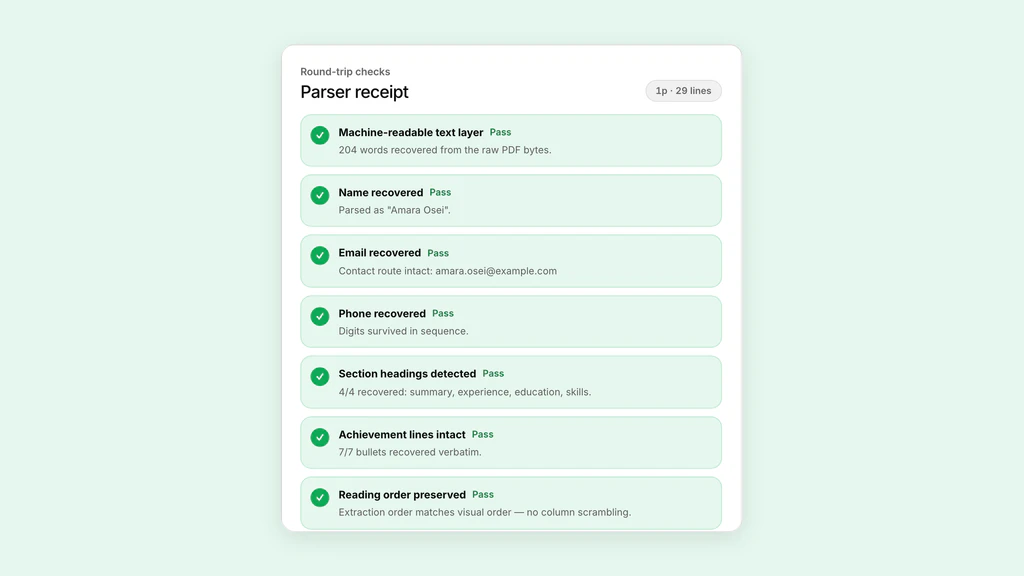
Run the exact PDF or Word file you send through an ATS checker. Your name, email, job titles, dates and bullets should come back in order.
Reread the screening questions and the must-haves: years, location, work authorization, licences. One wrong answer can end the application before anyone opens your resume.
Compare it with the job description. Every requirement you meet should be visible on the page, near the top.
Use the posting's exact names for tools, certifications and the job title, wherever they're true for you.
Each recent bullet says what changed because of you, with a number or a scale you can defend.
Favour fresh postings, log every application, and watch your reply rate after each change.
About two weeks after applying, send one short note to the recruiter. Then move on to the next job.
All seven checked. Now fix what failed.
Start with the first item you couldn't tick. The free ATS resume checker covers the file, your bullets and the match against a job in one pass on your own resume.
Is it normal to get no interviews?
More normal than it feels. Ashby, an ATS vendor, analysed 109 million applications to 247,000 jobs on its platform from January 2021 to March 2026. In 2021, about 7 to 8% of applications led to an interview. By early 2026 it was 3.6% to 4.7%, depending on the type of role.
Ashby's explanation is volume. Applications per hire tripled from 2021 to 2024 and stayed above 300 through 2025, and the teams it talks to report more applications sent by automated tools. In Ashby's words, recruiters aren't being selective by choice.
So a run of silence doesn't prove your resume is bad. But a crowded pile punishes small problems, and those are worth ruling out one at a time.
Ashby's figures come from employers that use Ashby, so treat them as one large sample, not the whole job market. Checked 13 Nov 2026.
Check these in this order
The first checks are quick and catch problems that hurt every application you send with that file. The later ones are about each job, and take longer. Each one has a free test you can run on your own resume.
| Check | What it rules out | Free test |
|---|---|---|
| 1. The file reads | Scrambled, missing or out-of-order text | ATS resume checker |
| 2. Fields land right | Name, dates or jobs read into the wrong place | Resume parser |
| 3. Hard requirements | Gaps in years, location, visa or licence | Resume vs job description match |
| 4. Searched words | Missing tool, skill and title names | Resume keyword scanner |
| 5. Proof in bullets | Duties with no results | Resume bullet checker |
| 6. Timing and replies | Late applications, no follow-up | Job tracker |
| 7. Interviews that stall | Answers that lose you the offer | Interview practice |
Do ATS robots reject good resumes?
Mostly, no. An applicant tracking system is a database with a workflow on top. In the systems we've documented, your resume is read to fill in a profile, then it waits in a list for a person. What screens people out is set up by the employer, and it happens in three places.
Knockout questions. An employer can mark a screening question so that one answer disqualifies you. Workable lets a recruiter auto-disqualify anyone who answers No to a yes or no question, and its help page says the candidate still gets the confirmation email and does not know they've been disqualified. Recruitee's knockout questions work the same way, and if the employer attaches a rejection email to the reason, it goes out right after you apply.
Recruiter search. Greenhouse lets a recruiter run a full text search across resumes and see every candidate whose resume matches, with a snippet showing where. If the posting says Salesforce and your resume says CRM tools, you don't come up.
A person skimming. TheLadders' eye-tracking study found recruiters spent about six seconds on a first look at each resume, with their attention on a few sections. A resume that hides its strongest result on page two loses there.
Some systems now add AI screening on top. Workable's documentation describes an agent that evaluates candidates against the employer's criteria and can advance or disqualify them at the Applied stage. That's one more reason to state each must-have plainly, in the posting's words.
As for the claim that 75% of resumes are rejected by an ATS before a human sees them: it's repeated everywhere, but we haven't found a public study behind it. When a resume can't be read automatically, the vendors we checked describe a slower path, not a rejection. Greenhouse says the recruiter then enters the candidate's details by hand.
| System | What can screen you out | Source |
|---|---|---|
| Workable | A No to a knockout question disqualifies you, and you aren't told | Workable Help |
| Recruitee | A knockout answer can send a rejection email right after you apply | Recruitee Help Center |
| Greenhouse | Recruiters search resumes by keyword; a failed read is typed in by hand | Greenhouse Support |
| Workday | Results vary with format and word order; images get in the way | Workday Administrator Guide |
1. Can the ATS read your file?
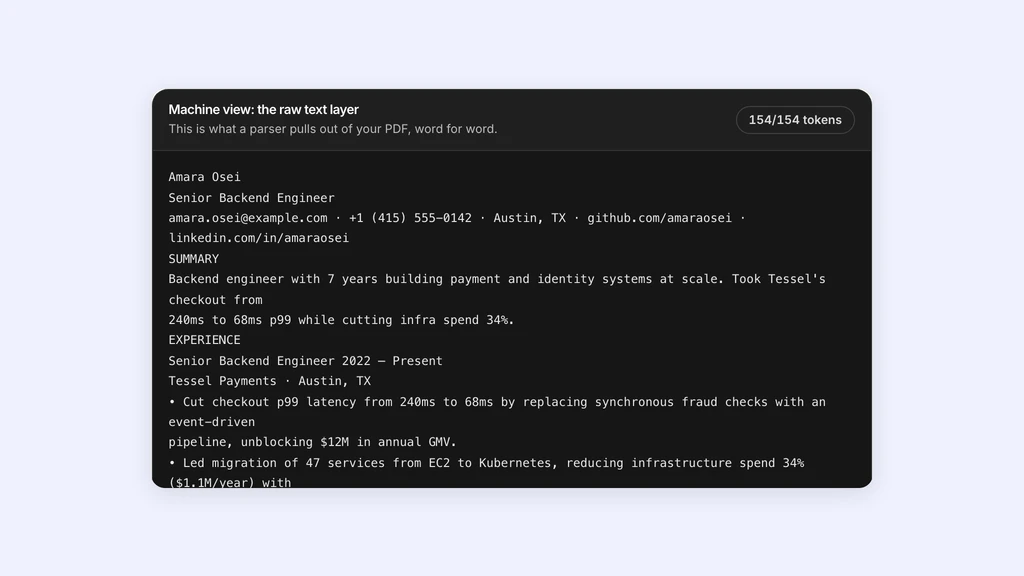
If the software gets your resume as scrambled or empty text, a recruiter's keyword search can't find you and the profile they open is a mess. It's the cheapest thing to rule out, so do it first.
Test it: open the exact PDF you send, select all, copy, and paste into a plain text editor. Your name, email, job titles, employers, dates and bullets should all be there, in order. For a closer look, drop the file into the free ATS resume checker, which shows the text and reading order a parser gets, or the resume parser, which shows each field it pulls out and what went missing.
What breaks it, from our own test of 108 resume PDFs read back with PDF.js:
- Two columns: 97.9% of the words came back, but 30.5% of the output lines fused text from both columns into sentences you never wrote.
- Tables: a table-style grid fused 24.1% of lines, mostly neighbouring cells joined into clumsy but readable lines.
- Headers and footers: contact details in the page margins came back, but moved to the end of the text, away from your name.
- Text in images: a scanned or image-only page returned 0% of its text. Workday's own guide says resumes without images or image-based styles give the best results.
Fix it in the source, then test the exported file again: one column, real text, contact details in the body of page one, plain section headings. Our write-ups of the two-column, table and header tests show the exact output, and the ATS guides list each vendor's file types and size limits.
2. Do you clear the posting's hard requirements?
This is the usual answer to “why am I not getting interviews with experience”. Experience doesn't help when the screen checks for something else: a minimum number of years with a named tool, a location or time zone, the right to work without sponsorship, a licence or a degree. Workable's screening guide tells employers to set knockout questions for exactly these: must-have skills, years of experience and location.
Test it: list the posting's must-haves, the lines with “required”, “must” or a number of years. Then mark which ones your resume shows on the page, which is a different question from which ones you have. The free resume vs job description match does this for you: paste both and it lists the must-haves you show, the ones you miss and the three fixes to make first.
Fix: read every screening question slowly and answer it truthfully. Workable's own FAQ suggests employers word them so that No means not qualified, as in “Do you meet all required qualifications for this role?”. Where you meet a requirement, make it visible near the top: the years, your city or that you'll relocate, your work authorization if the posting asks, the licence by name. If you're applying a level below your last title, say why in one line of your summary.
If you clearly miss a hard requirement, that application is a long shot. Put the time into a job you match.
3. Does your resume use the words a recruiter searches?
Recruiters don't only read what comes in. They search it, and your resume has to contain the word they type. A strong candidate who wrote “web analytics” is invisible to a search for “Google Analytics 4”.
Test it: paste the job posting into the free resume keyword scanner to see the terms it repeats most, then add your resume to see which ones you're missing.
Fix: use the posting's exact names for tools, certifications and the job title wherever they're true for you. Put each one in a bullet where you used it, as well as in your skills list, so the reader sees the proof next to the word. Never add a keyword you can't talk about in an interview.
4. Do your bullets prove results, or list duties?
Once you're found, a person reads. “Responsible for social media accounts” repeats your job description. “Grew the Instagram account from 2,000 to 9,500 followers in a year by switching to three short videos a week” tells them what changed because of you.
Test it: paste your recent bullets into the free resume bullet checker. It flags weak openings, missing results, buzzwords and length, and suggests stronger verbs.
Fix: for each recent bullet, add what changed: a number, a before and after, a scale, or a deadline you met. If you don't have an exact figure, use a count or a range you can defend, and never invent one. The resume bullet rewriter rewrites a weak bullet without making up numbers. Then put your best result first under your latest job, because a six-second skim reaches the top of each section and not much else.
5. Are you applying late, or too widely?
A posting that has been up for weeks may already have a shortlist. Across Ashby's customers, the median time from opening a job to its first hire was 56 days for business roles and 76 days for technical roles. From application to accepted offer took about 38 days for business roles and 48 for technical ones, on average. Apply in week six and the interviews may already be underway.
Volume cuts both ways. With more than 300 applications per hire, sending the same resume to more jobs adds to the pile without improving your odds on any one of them. Fewer applications, each tailored to a job you clearly fit, is the better use of an evening.
Test it: log every application with the date you sent it and the resume version you used. The free job tracker shows how many you've heard back from and the typical wait for a first reply. Note where you found each job, and after a few dozen applications compare which sources and which versions got answers.
Fix: favour postings from the last week or two, apply within a few days of finding them, and spend the time you save on messages to people who work there.
6. Why do you get ghosted after applying?
Often it has little to do with you. In Workable, a candidate knocked out by a screening question still gets the usual confirmation email and isn't told; the employer decides when, or whether, to send the no. Roles close, budgets freeze, and recruiters are working through hundreds of applications per hire, so many employers never send a rejection at all.
Silence in the first two weeks means very little. Ashby's averages put a hire at 38 to 48 days from application to accepted offer, so a reply can take weeks even when one is coming.
Follow up once. The University of Arizona's career centre says to wait two weeks after you apply, then message the recruiter by email or LinkedIn: say which role you applied for, why you're a good fit, and thank them. If that gets no answer, put the time into your next application.
The job tracker's Waiting on a reply list picks out applications a week past Applied with no next step, and copies a short follow-up note for you to send yourself.
7. Getting interviews but no offers?
Then your resume is doing its job and the problem has moved to the interview. Practise out loud before the real one. Pip, ATSPrep's interview coach, asks questions for the role, listens, follows up, and gives you a report with stronger answers. Your first call is free.
Common questions
Why am I not getting any job interviews?
Usually one of five things: the ATS can't read your file, a screening question knocked you out, your resume doesn't show the posting's must-haves, it's missing the words recruiters search, or your bullets list duties instead of results. Check them in that order. Some silence is the market: Ashby's 2026 data shows 3.6% to 4.7% of applications leading to an interview.
Why am I not getting interviews even with experience?
Experience doesn't clear a screen that checks for something else. Knockout questions and recruiter filters look for specific things: years with a named tool, location, work authorization, a licence. Make those visible near the top in the posting's words, and lead each recent job with a result.
Do ATS systems automatically reject resumes?
In most systems, an automatic rejection comes from rules the employer sets, mainly knockout questions. Workable and Recruitee both let a set answer disqualify you, and Workable also offers an AI agent that can disqualify applicants. A resume that reads badly usually still lands in the list, just harder to find.
Is it true that 75% of resumes are rejected by ATS?
We haven't found a public study behind that figure, and the vendors' own help pages describe nothing like it. What they do describe is knockout questions, keyword search, and recruiters typing in details by hand when a resume can't be read automatically.
Do online job applications actually get read by humans?
Yes, but not all of them closely. Ashby counted more than 300 applications per hire through 2025, so recruiters search, filter and skim. TheLadders' eye-tracking study found about six seconds on a first look. Your resume has to show up in the search and survive the skim.
Why do I get ghosted after submitting job applications?
Many employers never send a rejection, and some systems don't tell you when a screening question disqualified you: Workable sends the usual confirmation email either way. Roles also close or get frozen. Wait two weeks, follow up once, then put your time into the next application.
How long should I wait to follow up on a job application?
About two weeks. The University of Arizona's career centre says to wait two weeks after applying, then send the recruiter a short message by email or LinkedIn naming the role, why you fit, and a thank you.
How many applications does it take to get an interview?
There's no fixed number. Ashby's 2026 report found 3.6% to 4.7% of applications on its platform led to an interview, depending on the type of role: on average, about one interview for every 21 to 28 applications. Your own rate depends on fit and timing, so track it.
Find out which check you're failing. Free, in your browser.
- ATS resume checkerDrop your PDF or Word file to see the text an ATS gets, a note on every bullet and, with a job posting, how well you match. First check free, no sign-up.
- Resume vs job description matchPaste your resume and one job post for a match score, the must-haves you miss and your top three fixes.
- Resume bullet rewriterPaste a weak bullet and get it rewritten to show a result, with no numbers made up.
- ATS guides by vendorWhat Workday, Greenhouse, Lever and others accept, and what their own docs say breaks a resume.
Sources and further reading
- Recruiter Productivity | 2026 Talent Trends Report, Ashby
- Auto-disqualify candidates using application form questions, Workable Help
- Best practices: Candidate Screening, Workable Help
- Create an application form for each job, Tellent Recruitee Help Center
- Search resumes for keywords, Greenhouse Support
- Unsuccessful resume parse, Greenhouse Support
- Concept: Resume Parsing, Workday Administrator Guide
- TheLadders conducts landmark resume research with EyeWorks eye-tracking software, EyeTracking, Inc.
- How to follow up after applying for a job, University of Arizona Center for Career Readiness
Put it into practice on a real resume.
Each example is a complete resume with role keywords and bullets that show proof. Open one in the Studio and make it yours, then download it with a free account.