In this guide
A strong resume rarely comes from one draft. It comes from a review you can repeat. Most people edit only when a deadline appears, and that's when wording gets rushed, keywords get missed and a file that looks fine to a person reads badly to an applicant tracking system. Reviewing in layers, each with one job, fixes that.
The short version
- Review in order: target, content, keywords, ATS readability, then how it looks. Polishing spacing on a section you later cut is wasted time.
- Judge every bullet on relevance, impact and proof. Scope and frequency count when you have no number.
- Read the extracted text, not just the PDF. The ATSPrep Review and ATS checker show you both.
Resume review starts with the right source material
Before you touch a bullet, gather what the review should be measured against. A resume isn't a biography. It's a document aimed at one kind of role.
Take one target job posting, or a few similar ones, and treat them as the standard. Then compare your resume against them line by line. That keeps the review grounded in the words employers use instead of guesswork.
- Your current resume
- One target job posting
- Two or three similar postings
- Your LinkedIn profile
- A plain list of results you can back up
- Notes on the tools, systems and certifications you've used
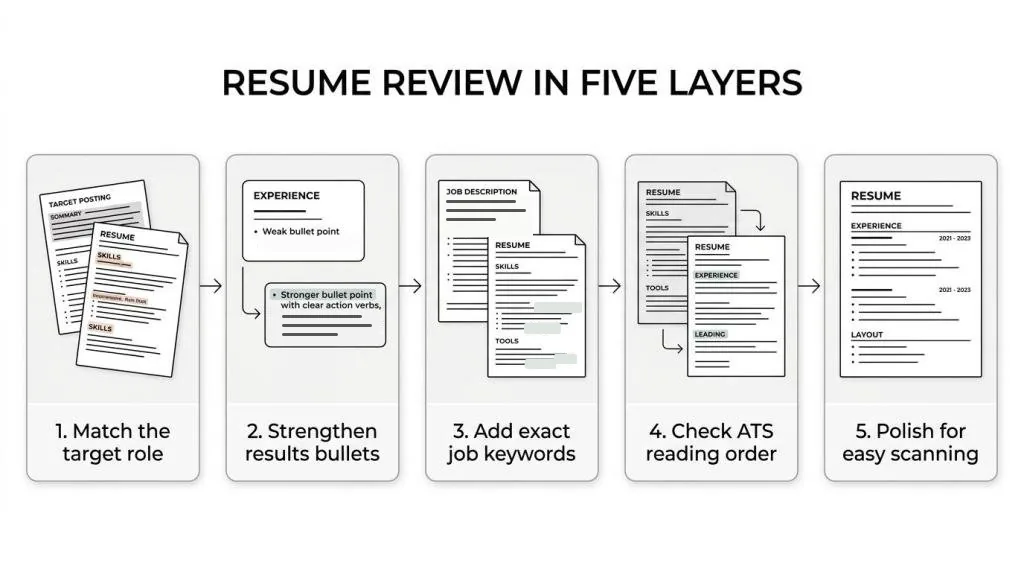
Resume review checklist: the five layers that matter most
Work from the big picture down to the details. Go the other way and it's easy to spend twenty minutes on the spacing of a section you then delete.
Fix the target first, then the substance, then whether software can read it, then how it looks.
| Pass | The question | Common problem |
|---|---|---|
| Targeting | Does this resume fit the role? | Too broad to point anywhere |
| Content | Are the bullets specific and strong? | Duties with no result |
| Keywords | Does the wording match the posting? | Key terms missing |
| ATS readability | Will the file parse cleanly? | Columns and text boxes break the order |
| Presentation | Is it easy for a person to scan? | Clutter and inconsistent dates |
Review resume targeting before you polish the language
A well-written resume can still miss if it's aimed at the wrong role. Start by checking that it clearly signals the job you want.
Look at your headline, summary, most recent role and skills. If the posting calls for project coordination, budgeting and reporting, those themes should show up early. If the top third of your page reads like a general profile, fix that first.
Ask whether a recruiter could name your target role within a few seconds. If not, swap broad phrases for role language, move the most relevant experience up, and trim older or unrelated detail. A quick test: put the first half of your resume next to the first half of the posting. The overlap should be obvious.
Review resume content for relevance, impact and credibility
Once the target is clear, go through the bullets. This is where most resumes lose momentum, listing responsibilities instead of outcomes.
Judge each bullet on three things. Relevance: does it support the target role? Impact: what changed because of your work? Proof: is there enough context to believe it? Then look for these upgrades:
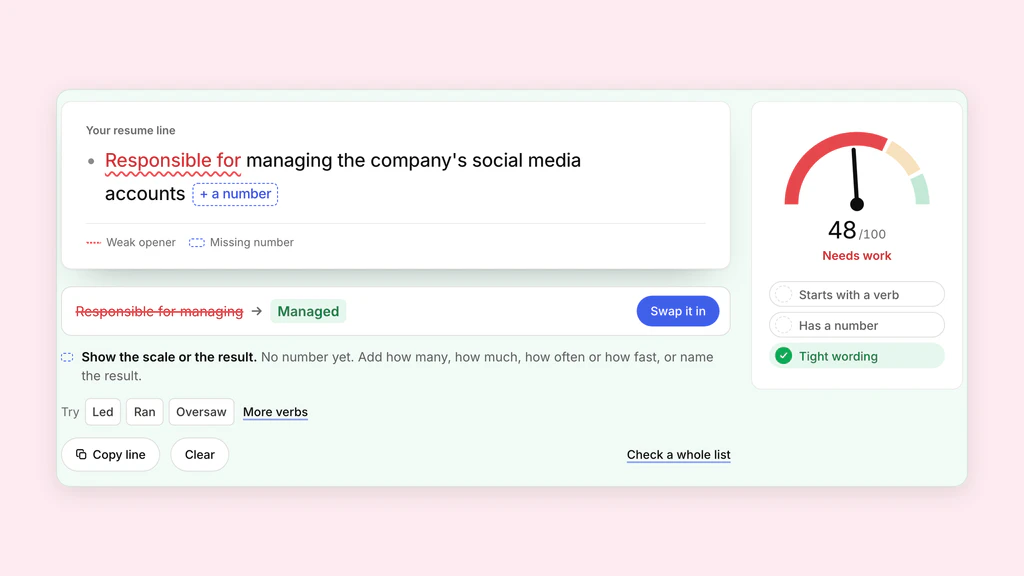
- Replace duty language. Swap responsible for with what you actually did.
- Add context. Team size, account scope, volume or the system you used.
- Show the change. Time saved, errors cut, turnaround improved, output up.
- Trim the noise. Cut bullets that state the obvious or don't serve the role.
- Before: Managed customer service emails and helped with reports. After: Answered customer service requests by email, resolved account issues, and prepared the weekly backlog report managers used to plan cover.
- Before: Worked on recruiting and scheduling. After: Scheduled interviews across several hiring managers and kept candidate status and records up to date.
Not every bullet needs a metric. When you don't have a number, show scope, frequency or audience instead, and never invent one.
Review every bullet line by line
Reading your own bullets critically is hard, because you know what you meant. A checklist that doesn't know helps.
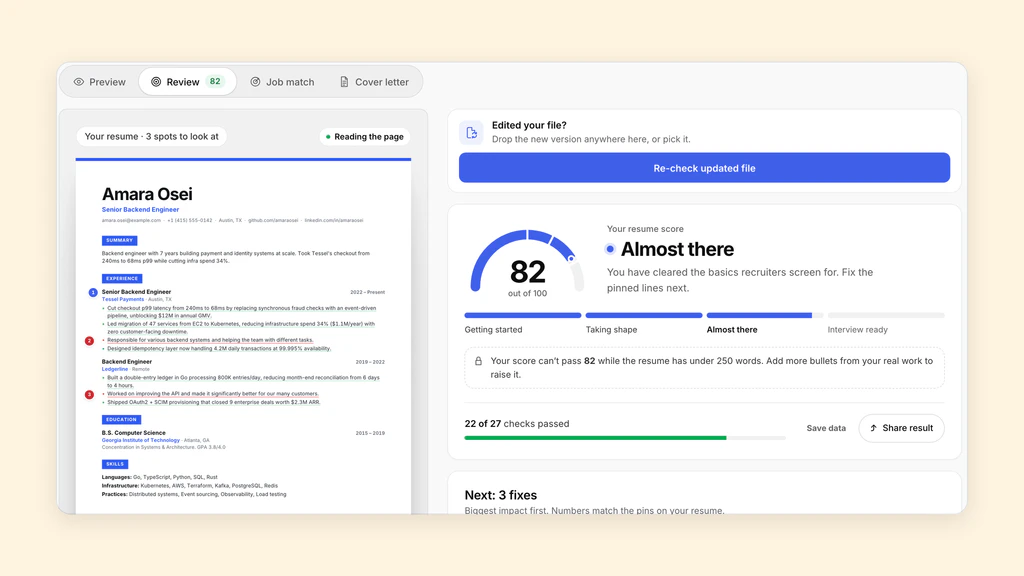
The Review in the ATSPrep Studio goes through each bullet and pins the ones that need work: no number or result, a vague word, a weak opening, passive voice or first person. Every pin says what to change. It runs fixed rules rather than a language model, so it never writes achievements for you.
To check a handful of lines without opening the Studio, paste them into the free bullet checker. It flags weak openings, missing results, buzzwords and length, and suggests stronger verbs to try.
Review your resume summary with discipline
The summary often collects polished phrases that say very little. Cut anything that could describe almost anyone.
A good summary answers three questions fast: who you are professionally, what role you're aiming for, and which strengths matter for it. That's usually three to five lines, not a paragraph of adjectives. If you see results-driven professional or excellent communication skills, ask whether your experience section can show it instead. Often the best fix is a shorter summary.
Review keywords with the job description beside you
A keyword review isn't about stuffing terms onto the page. It's about using the same words employers use when they search and scan.
Put the posting next to your resume. Mark the skills, software, certifications and phrases that repeat or sit near the top. Then check that each one appears naturally in your summary, experience or skills. Exact wording matters: if the posting says vendor management and you wrote worked with outside partners, the meaning is close but the search term isn't there.
Job match in the ATSPrep Studio does this comparison for you. Paste the posting and it lists the terms it asks for, marking the ones your resume already has and the ones it never mentions.
Review ATS formatting by checking the extracted text
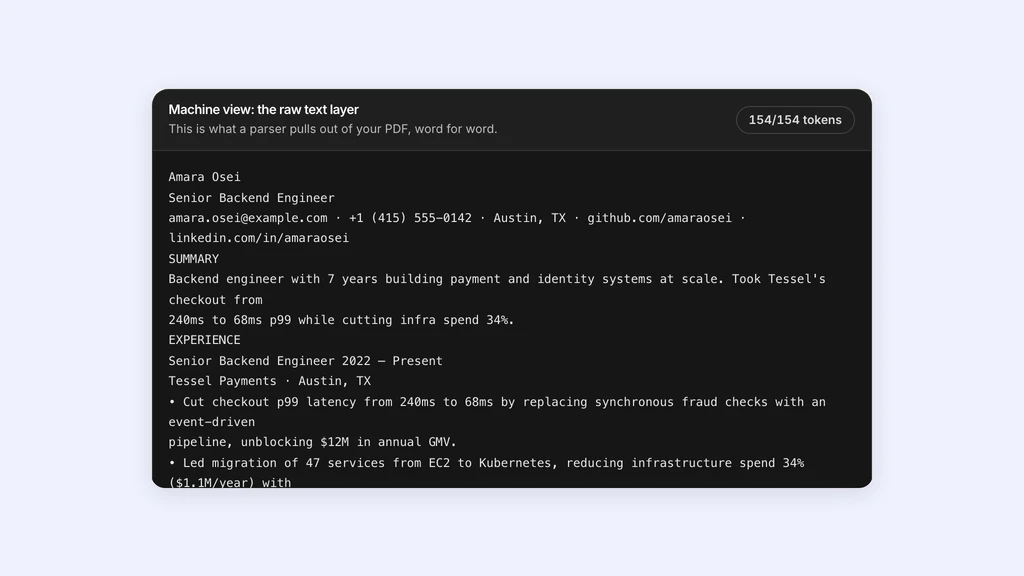
This is the pass most people skip. A resume can look excellent as a PDF and still parse badly: headings break, dates drift away from job titles, sidebars scramble the order and text inside graphics disappears.
So this review is textual, not visual. You want to see what a system pulls out of your file and in what order. The ATS checker reads your PDF or Word file in your browser and shows exactly that, with nothing uploaded and no account. Common causes of trouble:
- Multi-column layouts
- Text boxes
- Icons used instead of labels
- Contact details in the header or footer
- Tables holding major sections
- Decorative graphics
Review section labels and resume structure for ATS compatibility
Section labels should be plain: Experience, Education and Skills are safer than creative alternatives. Keep dates in one format. Make job titles and employer names easy to tell apart. Use a simple contact block with your name, phone, email, LinkedIn URL and, if it matters, your city.
If you send a PDF, test the extracted text. If you send a Word file, check the spacing and line breaks after saving. Follow the employer's instructions on format; the standard stays the same either way: a clean reading order, clear labels and no hidden surprises.
Review your resume for human scan speed
After the content and ATS passes, go back to the designed version and read it as a recruiter would, quickly.
Check that the hierarchy is clear: headings stand out, bullets are short, there's white space for the eye to rest, and dates line up. Look for small trust issues too. One odd date format won't sink you, but several inconsistencies in capitalisation, punctuation, tense or abbreviations make the page feel less careful.
Try this: look at your resume for ten seconds, look away, and list what you remember. If the answer is vague, the page is doing too much.
Build a repeatable resume review workflow for every application
You don't need to rewrite from scratch for each role. You need a master resume, a targeted copy, and a record of what changed.
- Keep one master resume with your full history.
- Copy it for each type of role you target.
- Review the summary, top skills and recent bullets against the posting.
- Run a keyword check.
- Check the extracted text and reading order.
- Save the final version under a clear name. The Studio keeps up to 20 saved versions in your browser.
- Log the job, the version you sent and your next step in a tracker. ATSPrep's is free and links each job to the resume you used.
Review your resume with a time gap and fresh eyes
One of the easiest ways to review better is to stop for a few hours and come back. Distance shows you repetition, weak bullets and glitches you stopped seeing while drafting.
On a tight deadline, change the format instead. Print it. Read it aloud. Paste it into a plain text file. Run it through an ATS checker. Each view surfaces different problems.
Review for honesty, clarity and confidence
A persuasive resume doesn't need inflated claims. It needs accurate language at the level you really worked. In the last pass, cut anything vague, overstated or hard to defend in an interview.
Confidence on paper comes from precision: name the tools, state the scope, describe what you owned. If a line would be hard to explain on a screening call, rewrite it now. When the target is clear, the bullets are relevant, the keywords fit and the file parses cleanly, your resume is ready to send.
Review your resume one pass at a time. Free, in your browser, no sign-up needed.
Sources and further reading
- Résumé resources, Purdue Online Writing Lab
- Create a resume/CV or cover letter, Harvard FAS Mignone Center for Career Success
Put it into practice on a real resume.
Each example is a complete resume with role keywords and bullets that show proof. Open one in the Studio and make it yours, no account needed.