In this guide
A resume scanner sounds like a gate that turns good people away for reasons nobody can see. In practice it's the part of an applicant tracking system that reads your file, sorts the text into fields like job title, employer and dates, and stores the result so recruiters can search it. You can't see inside an employer's system, but you can check the part you control: whether your file gives back clean text in a sensible order.
The short version
- A resume scanner extracts your text, finds your sections and stores them as a searchable profile. It reads and sorts. People make the decision.
- Most scanner problems start with layout: columns, text boxes, icons, and contact details tucked into a header.
- Test the exact file you plan to send. The ATSPrep ATS checker shows the text it reads back, in order, without uploading your file.
What a resume scanner actually does
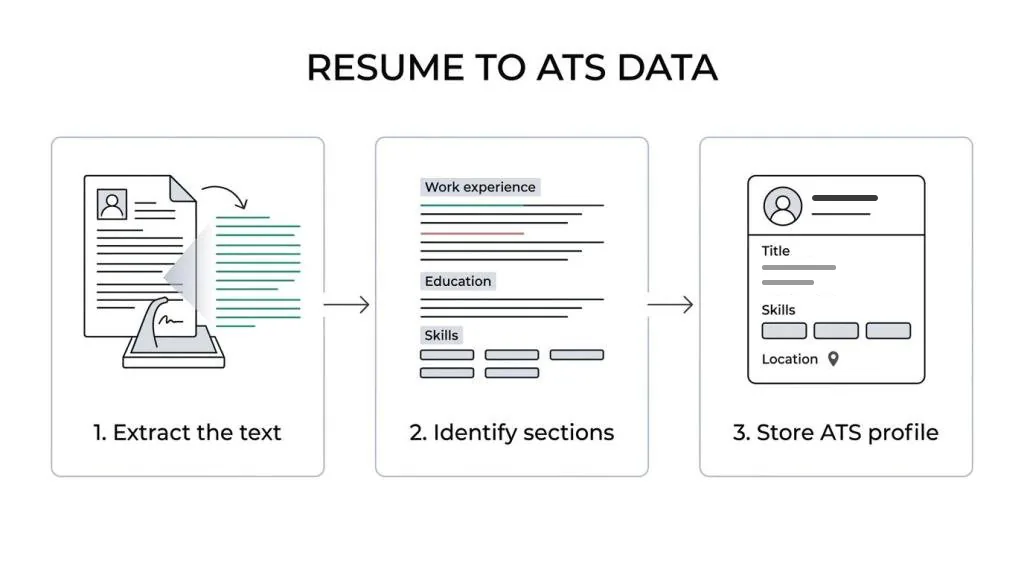
A resume scanner does three jobs. It extracts the text from your file. It works out which lines belong to which section, such as work experience, education and skills. Then it stores those details as a structured candidate profile that recruiters can search and filter.
That matters because a recruiter doesn't always start with your designed PDF. Depending on how their system is set up, they may first see parsed fields, matched skills, dates and titles. A resume that looks sharp to a person but parses badly can arrive with gaps before anyone reads it.
So your resume has two readers at once: the recruiter looking at the page, and the scanner turning that page into text.
| Scanner task | What it looks for | What helps |
|---|---|---|
| Text extraction | Every word, in reading order | Real, selectable text and a simple layout |
| Section recognition | Experience, education, skills, contact details | Common section headings |
| Role and date parsing | Job titles, employers, start and end dates | The same format for every role |
| Keyword matching | Skills and terms from the job posting | The posting's wording, where it's true for you |
| Search indexing | Fields a recruiter can search | Named tools, titles and certifications |
How ATS resume scanners parse your file
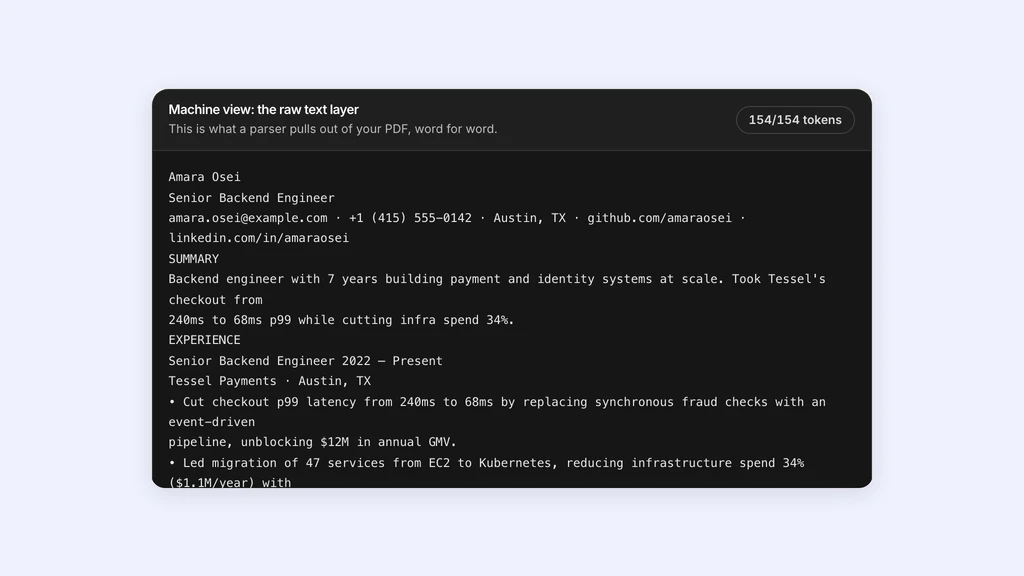
Parsing is the step to care about most. The software reads your file line by line and decides what each piece of text is: a name, a job title, a date, a bullet.
If it reads your contact details out of order, splits one job into two, or welds two columns into one line, the record inside the ATS gets messy fast. A qualified candidate can end up looking incomplete.
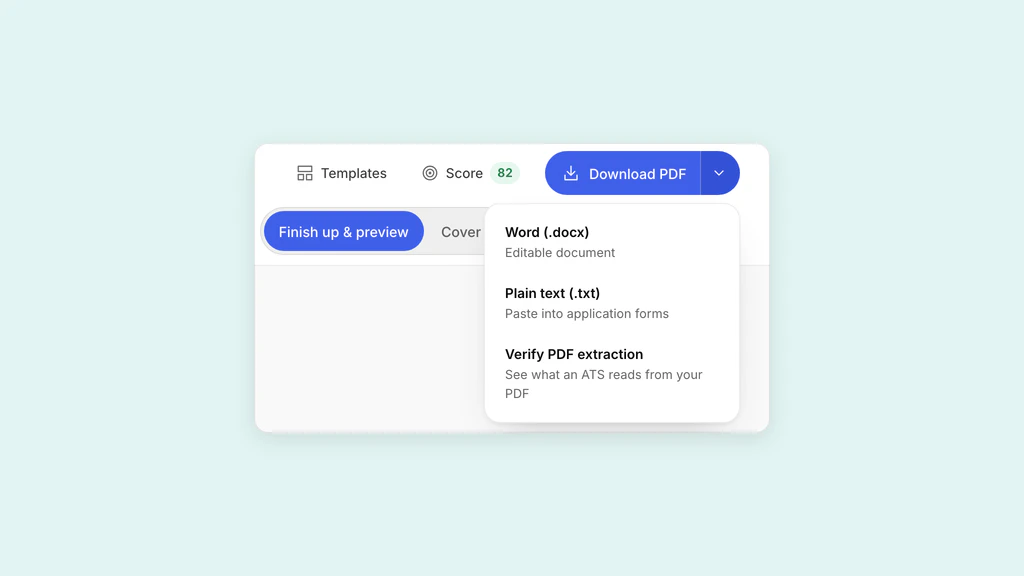
The most useful test is to look at the extracted text yourself. The ATSPrep ATS checker reads your PDF or Word file the way a parser does, right in your browser, and shows what comes back in reading order. Your file isn't uploaded and you don't need an account. Read that version, not the designed one, and watch for these trouble spots:
- Tables and multi-column layouts
- Text boxes
- Icons used instead of words, like a phone symbol in place of a label
- Contact details placed in the header or footer
- Section titles drawn as graphics
- PDFs exported from design tools, and scans, which have no text layer at all
What resume scanners look for in resume content
Once your file reads cleanly, the content takes over. A scanner looks for clues that connect your experience to the role: skills, job titles, software, certifications, education and dates.
Keywords are part of that, but they're often misunderstood. Repeating one phrase twenty times doesn't help. What helps is describing your work in the words an employer would use. If a posting asks for project management, stakeholder communication and budget forecasting, and your resume only says you led teams and handled reporting, you're underselling work you've done. The fix is usually wording, not new qualifications.
With the posting open beside your resume, check these:
- Job titles. Use the clearest accurate title for each role, especially if your internal title was vague.
- Skills. Name the tools, platforms and methods instead of implying them.
- Evidence. Put keywords inside bullets that show what you did, so the page still reads well to a person.
- Dates. Show month and year the same way for every role.
- Credentials. Write certifications, licences and degrees by their standard names.
How resume formatting affects resume scanner results
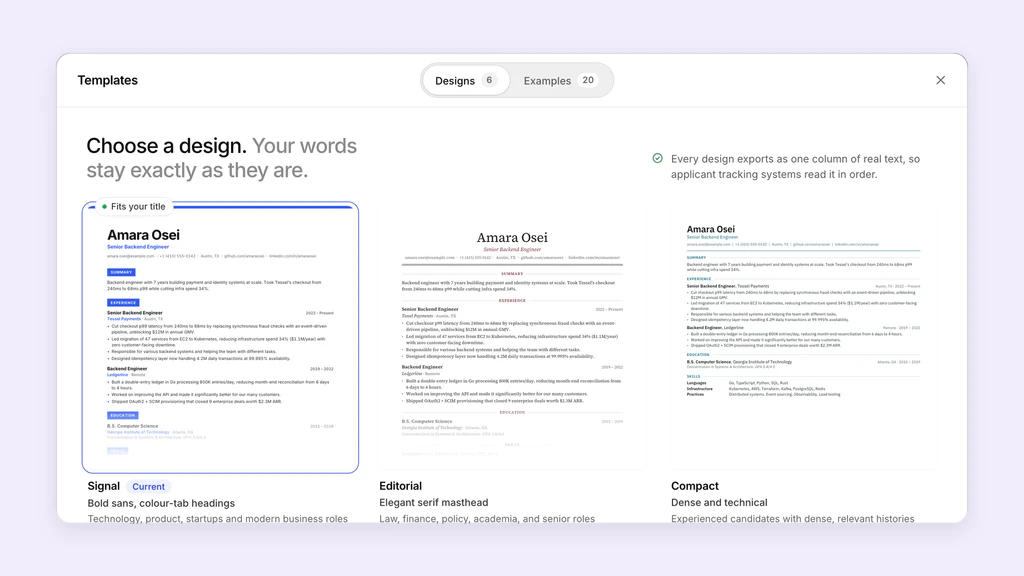
A clean layout helps the scanner and the recruiter alike. Decoration like sidebars, shaded boxes and icons can break extraction and confuse section recognition. That doesn't mean your resume has to look plain. It means structure comes first.
Use common headings like Work Experience, Education and Skills. Put your name and contact details at the top of the page as plain text. Give every role the same order: title, employer, location, dates, then bullets. Stick to standard bullet characters, and keep anything important out of headers, footers and graphics.
File type matters too. Many systems accept PDF and DOCX, but not every PDF behaves the same. One that looks perfect on screen can still give back scrambled text if it was exported from a design tool or built in layers. Testing the actual file before you apply is the only way to know.
Step-by-step resume scanner check before you apply
This takes a few minutes once it's a habit. The point is to test the file you'll actually send.
- Save your resume in the format the employer asks for.
- Drop that file into an ATS checker and read the text it gives back from top to bottom.
- Fix anything out of order, missing, or mixed into the wrong section.
- Paste the job posting into a keyword match and add the missing terms you can honestly claim.
- Export the new version and test it again. If you build it in the ATSPrep Studio, X-Ray reads the exported PDF back and checks that your name, contact details, headings and bullets all came through.
- Send the version that reads cleanly.
Resume scanner mistakes that hurt strong candidates
Good applicants trip over the same few problems, often while trying to make the resume look more impressive.
- Too much design. If a person needs a second to find where to look, a parser may struggle too.
- Keyword mismatch. If the posting names a skill and you have it, use that exact wording.
- Missing context. A tool name with no project, scope or result convinces nobody.
- Generic bullets. Broad claims make it hard for software and recruiters to see the fit.
- Losing track of versions. If one company got a tailored file and another got an older one, you can't tell what worked. A tracker that records which resume went where fixes that.
How to tailor your resume for a scanner without sounding robotic
Start with the employer's language, then map it to what you've really done. Read the posting for terms that repeat across the responsibilities, required skills and preferred qualifications.
Update the places where those terms carry the most weight: your headline, your summary if you have one, your most recent bullets and your skills section. Only use a phrase like cross-functional collaboration if you've done that work.
Seniority matters more than most people expect. A senior posting talks about ownership, mentoring and stakeholders. If you've done those things, say so plainly. A simple order to follow:
- Match the title, where it's accurate
- Match the tools and methods
- Match the business context
- Match the level of responsibility
How to use ATSPrep in a resume scanner workflow
A tool only helps if it fits a routine you can repeat for every serious application. Start from a clean resume, either your own file or one built in the Studio. Run it through the ATS checker and read the parsed text. Paste the job posting into Job match to see which of its terms you cover and which you never mention. Then save that version and add the job to your tracker, so you know what you sent.
Be clear about what this does and doesn't prove. ATSPrep doesn't connect to any employer's ATS or copy how it ranks people. A clean read-back shows that your file has usable text in a sensible order. It doesn't promise an interview.
A resume scanner doesn't have to feel like a black box. Once you've seen how your file parses and which words carry weight, the best resumes are simply the ones that read clearly in both places that matter: inside the system and in front of the recruiter.
Scan your resume before an employer does. Free, in your browser, no sign-up needed.
Sources and further reading
- Supported file formats, Textkernel
- PDF.js, Mozilla
Put it into practice on a real resume.
Each example is a complete resume with role keywords and bullets that show proof. Open one in the Studio and make it yours, no account needed.