In this guide
Placing contact details in the page header or footer is common in polished resume templates. The name sits at the top, the email and phone sit in the margin, and the visual hierarchy is clean. We tested this layout across 9 profiles. Recovery was perfect: 100%. But the contact line did not stay where it was placed. It moved to the very end of the extracted text, a long way from the name it belongs to. This is the mildest real finding in the study, and it is still worth understanding.
The short version
- Recovery was 100% and welding was 0%. Nothing was lost or fused.
- Reading-order fidelity dropped to 93.7% because the contact line relocated to the end of the text.
- A reader works down the page by coordinate. Margin content sits outside the main text flow and is processed last.
- If software looks for a phone number near a name, distance matters even when nothing is missing.
What happens when contact details sit in the margins
A PDF page has a content area and margins. Text placed in the margins, typically through a header or footer, is stored with coordinates that sit above or below the body text. A reader processes fragments by position, usually top to bottom, and margin content can end up being read after everything in the main content area.
In our test, the contact line (email, phone and city) was placed in the page header area. The name was in the body. When the reader extracted the text, the contact line appeared at the very end, after Education, rather than near the top where a reader would expect it.
This is not extraction failure. Every word came back. Every email address was intact. The order changed, and only in one specific way: the contact details moved from near the top to the bottom.
What the extracted text looks like
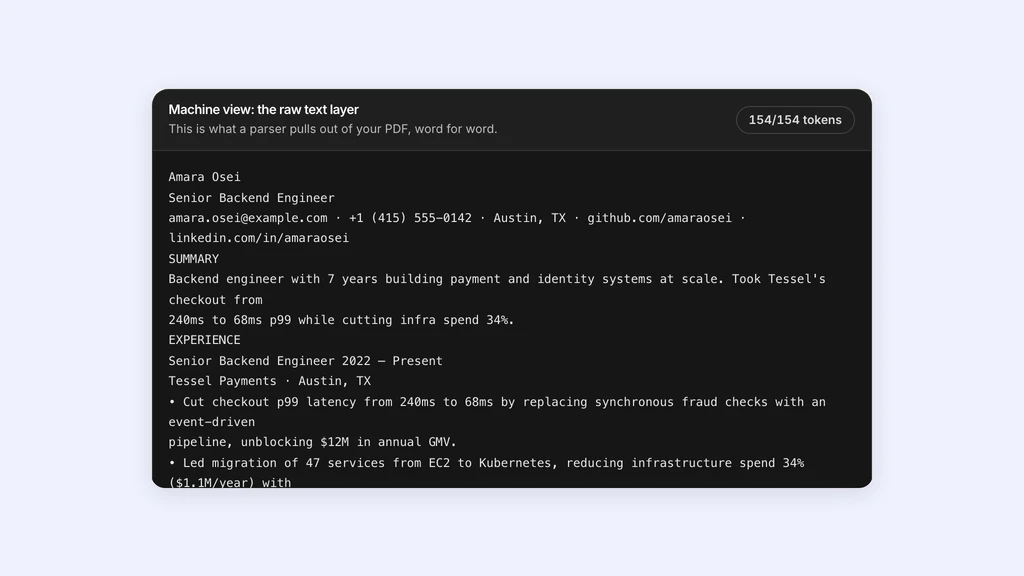
Here is the verbatim output from the header-footer condition. The name is at the top, the experience, skills and education follow in perfect order, and then the contact line appears at the very end.
In the ground truth, the contact line was the third line from the top, immediately below the name and title. In the extracted output, it is the last line. The distance between the name and its contact details went from two lines to the entire length of the document.
Every other line is in the correct position. There is no welding, no word loss, no structural damage. The only change is the location of that one line.
The last line is marked because it has been relocated, not because it was fused from unrelated content. The welding metric for this condition is 0%.
- 01Jordan Rivera
- 02Senior Backend Engineer
- 03EXPERIENCE
- 04Senior Backend Engineer, Northwind Systems
- 052022 - Present
- 06- Migrated 47 services from virtual machines to Kubernetes across three regions.
- 07...
- 08EDUCATION
- 09BS Computer Science, University of Texas at Austin, 2019
- 10jordan.rivera@example.com | 555-0142 | Austin, TX
The metrics in context
The header-footer condition scored 100% word recovery, 93.7% reading-order fidelity, and 0% welding. Email addresses were 100% intact. Block integrity was 100%.
Compare that with the two-column layout: 97.9% recovery, 83.6% order, 30.5% welding. The margin layout is better on every axis. The only departure from the control is the order score, and that reflects a single relocated block rather than systemic interleaving.
This is the mildest real finding in the study. It is worth reporting because the mechanism, content relocating based on coordinate position, is the same mechanism that causes the more severe problems in other layouts. Understanding why it happens here helps explain why it happens everywhere.
| Layout | Recovery | Order | Welded |
|---|---|---|---|
| Single column | 100% | 100% | 0% |
| Contact in margins | 100% | 93.7% | 0% |
| Two columns | 97.9% | 83.6% | 30.5% |
- Single column100%
- Contact in margins93.7%
- Table grid93.4%
- Two columns83.6%
- Scanned image0%
Why distance matters even when nothing is missing
If a system is scanning the extracted text for keywords, the location of the contact line does not matter. The email address is present; a regex will find it anywhere in the text.
But if software is trying to build a structured profile, associating a name with an email and a phone number, proximity is a useful signal. Many parsers assume the contact block is near the top of the document, close to the name. When it lands at the bottom, after education, the association weakens.
This is a softer failure than welding. Nothing is corrupted. The information is all present and all correct. It is simply not where a reader, human or automated, expects it to be. Whether that matters depends entirely on how the downstream system works.
What to do about it
The simplest fix is to keep contact details in the body of the document rather than in the page margins. Place them directly below the name, as inline text, and they will stay in that position through extraction.
If you prefer the visual effect of margin-placed contact details, know that the information will survive but may relocate. Test the result by pasting the extracted text and confirming that the email and phone appear near the name.
For rotated sidebars, the same principle applies. The content survives, but it will not appear where the eye expects it. If the rotated content is purely decorative, the relocation is harmless. If it contains information a system needs to associate with other parts of the resume, it may not be found where expected.
- Place contact details in the body, directly below the name, for the most reliable extraction.
- Margin-placed contact details will survive but may land at the end of the text.
- Rotated text is recovered but appears at the end, potentially in reverse order.
- Test by extracting and checking whether the contact block sits near the name.
One reader was tested: PDF.js, the same library the X-ray runs. Employer systems use different extractors and may produce different results. Findings describe how these formatting choices behave under extraction, not how any particular company screens.
Study limits
The corpus is synthetic: all 108 files were generated with pdf-lib rather than collected from real applicants. This means every variable is controlled and the intended text is known exactly, but it also means no one's personal data is involved.
One reader was tested: PDF.js, the same library the X-ray runs. Employer systems use different extractors and may produce different results. Findings describe how these formatting choices behave under extraction, not how any particular company screens.
The margin placement we tested used a single header region. Some templates use both headers and footers, or split contact details across multiple margin positions. Those configurations were not tested and may produce different relocation patterns.
Sources and further reading
- PDF.js, Mozilla
- pdf-lib, pdf-lib
- Semantic Structure — WebAIM, WebAIM
Put it into practice on a real resume.
Each example is a complete resume with role keywords and bullets that show proof. Open one in the Studio and make it yours, then download it with a free account.