In this guide
The ATS resume best practices that hold up in 2026 are about whether software can read your file, not about tricks. Send a file with a real text layer, keep the body in one column, put your name and contact details in the first lines of the body, write headings as plain words, use the posting's exact words, and send a PDF or DOCX under 1 MB. Each practice below links to the test or vendor page behind it. “For 2026” means checked against our tests and vendors' own documentation as of November 2026, not a forecast.
The short version
- A scanned page is the one thing that loses everything: it gave back 0% of its words. Every other layout we tested returned at least 96.9%.
- What layouts damage is order, not words. Two columns kept 97.9% of the words but fused 30.5% of the lines into sentences nobody wrote.
- Contact details in a header, footer or text box moved, and each reader put them somewhere different. Greenhouse lists all three as causes of failed resume reads.
- Tight spacing, decorative bullets, dashes and curly quotes made no measurable difference, and 17 of 18 fonts read back word for word.
The checklist Each item is backed below.
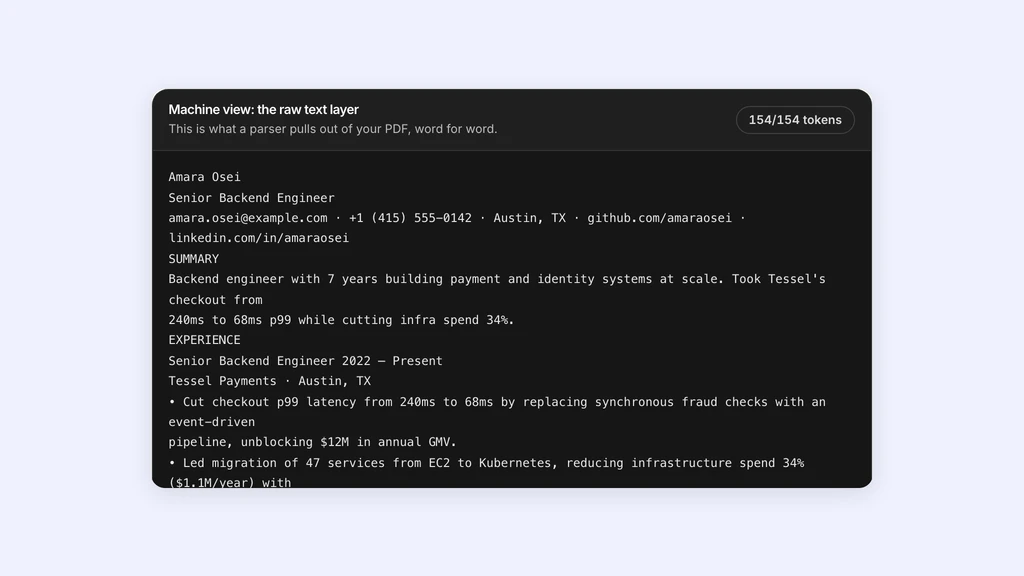
Open the PDF, select all, copy, and paste into a plain text editor. If nothing selects, the file has no text for software to read.
A sidebar or second column gets read first or fused line by line with the main column.
Put them in the first lines of page one, not in the page header, the footer or a text box.
Skills go on one line, separated by commas. If a table has to stay, send the DOCX.
No extra letter spacing on EXPERIENCE, SKILLS or EDUCATION, and no icons in place of words.
Make the PDF from the app you wrote it in, on a computer that has the font. Never print and rescan.
PDF or DOCX, under 1 MB.
Use its exact names for tools, certifications and the job title, wherever they're true for you.
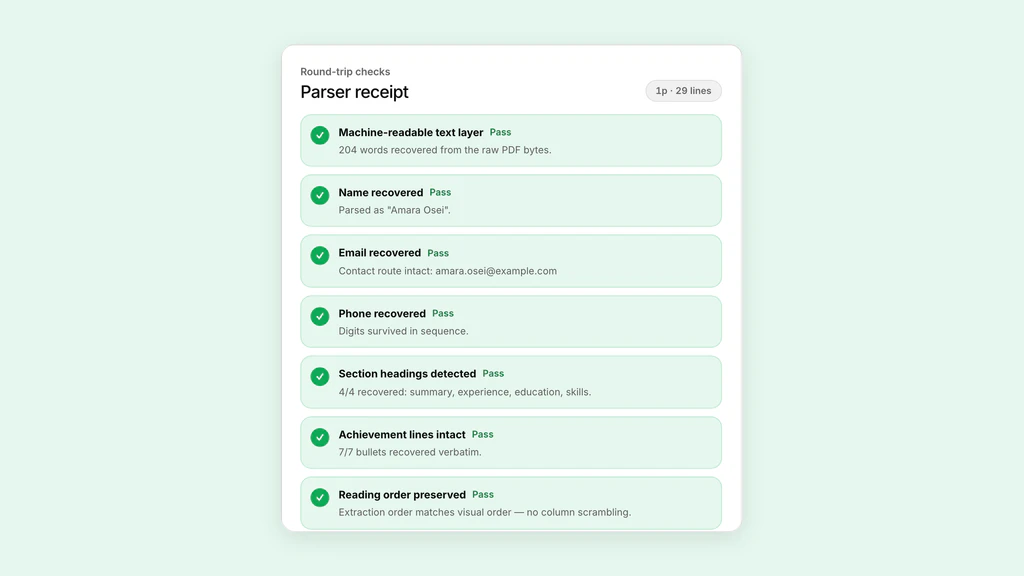
Check that your name, email, job titles, dates and bullets come back, in order.
All nine ticked. Now check the file itself.
The free ATS resume checker shows the text and reading order your exact PDF or Word file gives back, and flags what's missing.
Where each practice comes from
A lot of ATS advice is repeated without a test behind it. We wanted each practice here to rest on something you can check, so it comes from one of our own tests or from a vendor's own help page. Our extraction study generated 108 resume PDFs and changed one thing at a time. Later tests read real Chrome and LibreOffice exports with pdf.js, pdftotext, MuPDF and our own checker.
The table links to the post behind each row. Each post shows the files, the readers and the raw output.
| Practice | What we found | Evidence |
|---|---|---|
| Send a real text layer | A scanned page gave back 0% of its words | Scanned resume test |
| Keep one column | Two columns fused 30.5% of lines | Two-column test |
| Contact details in the body | Header and footer text moved, every reader differently | Header and footer test |
| Tables only where safe | A table grid fused 24.1% of lines | Tables test |
| Plain headings | Letter-spaced headings came back one letter at a time | Letter-spacing test |
| Common font, exported properly | 17 of 18 fonts read back word for word | Font test |
| PDF or DOCX, under 1 MB | All 19 systems we cover take both | File limits table |
| Use the posting's words | Greenhouse recruiters search resumes by keyword | Greenhouse Support |
| Test the exact file | The same file came back in different orders in different readers | How to see what an ATS reads |
1. Send a file with a real text layer
This is the practice that matters most. In our study, a scanned resume page returned 0% of its words, its email address and its structure. The reader didn't misread it: there was no text to read. Every other condition we tested, including the layouts that scrambled the order, still returned at least 96.9% of the words.
Workday's own guide to resume reading says resumes without images or image-based styles give the best results. A scan, a photo of a printout, or a PDF flattened into an image is exactly that.
Test it in ten seconds: open the PDF, select all, copy, and paste into a plain text editor. If nothing selects, or the text comes out as symbols, fix the file before you send it. Export it again from the document you wrote it in. Don't print and rescan it. Software that recognises text in images guesses each letter from pixels, and how well it guesses depends on the scan.
2. Keep the body in one column
A PDF doesn't store columns. It stores positioned bits of text, and a reader rebuilds lines from whatever sits at the same height. On a two-column resume it often takes one fragment from each column and writes them out as one line. In our study, two-column resumes kept 97.9% of their words, but 30.5% of the lines came back fused from both columns, and reading order scored 83.6%. A narrower gutter made it worse: 33.1% fused.
In a later test with three readers, a left sidebar was read before the main column. pdf.js and pdftotext both returned the whole sidebar first, contact details and skills, and the name came out on line 11.
Greenhouse lists “Resumes that have a columned layout” among the causes of a failed resume read in its support article. The single-column control in our study scored 100% on words and 100% on order, with no fused lines. If you keep a sidebar, keep it short, give it a wide gap, and put nothing in it that has to stay next to the body text beside it.
3. Put your name and contact details in the body
Templates often put the email and phone number in the page header. In our study every word came back, but reading order dropped to 93.7%, because the contact line moved to the very end, after Education, far from the name it belongs to.
Real exports did the same thing in different ways. On a two-page PDF, pdf.js returned the header and footer at the end of each page and put “Page 1 of 2” between two jobs. pdftotext returned the header first and again after page one. Contact details in a text box came back in a different place in each reader we used.
A Word file keeps its header in a separate part of the file, outside the main text. Our own importer missed the name, email and phone in a Word header until we fixed it on 20 October 2026, and other software may still miss them. Greenhouse lists name and contact information in the header, footer or a text box as a cause of failed reads. Put them in the first lines of the body, and leave page numbers off a one-page resume.
4. Use tables only for related cells, or send a DOCX
Tables behave like milder columns. A table grid of dates and roles kept 97.6% of its words, scored 93.4% on reading order, and fused 24.1% of lines. Those welds joined cells that belong together, like “2022 - Present Senior Backend Engineer, Northwind Systems”, which is clumsy but still readable.
Skills grids are riskier. pdftotext read our grid column by column, so a reader expecting one skill per cell, or a list, got neither. One line under a SKILLS heading, separated by commas, came back identically from every reader we tested.
A table inside a DOCX is stored row by row in reading order, and our importer read every role, bullet and skill from it. The same table saved as a PDF came back in different orders from pdf.js and pdftotext. Greenhouse names “Complex resumes with tables, headers, and footers” as a cause of failed reads, so if a table has to stay, send the Word file where the posting accepts it.
5. Write headings as plain words, without letter spacing
Wide letter spacing on headings looks polished and reads badly. It pushes every letter far enough from the next that a reader treats each one as its own word, so EXPERIENCE comes back as “E X P E R I E N C E”. Letter-spaced headings returned 96.9% of words, the lowest of any resume in our study that had a text layer. The body text was fine. The damage was all in the headings.
Those are the worst words to lose, because section headings are how software splits a resume into experience, education and skills. In our font test, pdftotext split a letter-spaced “SUMMARY” into “S UM M A RY” in one of our own designs.
Icons in place of words fail too. Font Awesome icons in front of contact details came back from our readers as codes with no meaning, such as <U+F095>. The word “Email” costs nothing.
6. Use one common font, and export the PDF where it's installed
The font itself barely matters to the software. We set one resume in 18 fonts, made PDFs from Chrome and LibreOffice, and read each with three readers. 17 of the 18 came back word for word. The one miss was Inter in Chrome's PDF, where pdf.js returned some punctuation as codes.
What did break text was the computer making the PDF. A Word file set in Garamond, turned into a PDF on a computer without that font, came back from pdf.js with only 14 of 22 lines exact. And in our dashes test, when we removed the PDF's text map (the table that tells a reader which letter each shape is), every one of 13 lines came back changed in every reader: an en dash became “±”.
With the text map and the intended font in place, en and em dashes, curly quotes, bullets and fi and fl ligatures all came back exactly, and the DOCX kept all 13 lines. So make the PDF from the app you wrote the resume in, on a computer that has the font, and pick one plain font for the person reading. MIT's resume checklist names Arial, Calibri and Times New Roman as easy-to-read examples, at 10 to 12 point.
Writing in Arabic or Hebrew? In our right-to-left test the DOCX kept every line in order, while PDFs returned year ranges and phone numbers reversed or out of order in several reads. Send the DOCX where it's accepted.
7. Send a PDF or DOCX, under 1 MB, as the posting asks
We collected the file rules for the 19 applicant tracking systems we cover from each vendor's documentation. Every one accepts both PDF and DOCX. The tightest published ceiling is 1 MB, in Oracle Taleo. Greenhouse takes uploads up to 100 MB but reads only files up to 2.5 MB, so a bigger file uploads without an error and arrives with nothing filled in.
Keeping the file under 1 MB clears every limit in our table. What makes a resume big is photos, full-page background images and scans, which you don't need anyway.
If the posting names a file type, send that one. If it accepts both, a PDF you've tested keeps your layout, and a simple DOCX is easy to read and edit. In our tests the DOCX read cleanly in the cases where PDFs struggled: a Word table, right-to-left text, and a resume whose font was missing on the computer that made the PDF.
8. Use the posting's exact words
In the systems we've documented, most screening is set up by the employer, and one common filter is a recruiter's keyword search. Greenhouse lets recruiters run a full text search across resumes and see every candidate whose resume matches. If the posting says Salesforce and your resume says CRM tools, you don't come up.
So use the posting's own names for tools, certifications, licences and the job title, wherever they're true for you, and put them where a person skimming will see them too: your summary, your skills line and the bullets that prove them. Workday's guide adds that its results vary with format and word order, which is one more reason to keep each skill as plain text in a plain line.
Don't copy text you can't back. A recruiter reads what the search finds, and an interviewer asks about it.
9. Test the exact file you send
Every reader we tested handled the same file a little differently: the same table came back row by row in one and column by column in another, and the same text box landed in three different places. You can't know which reader an employer licenses, but you can rule out the failures that break all of them.
Test the file you actually upload, not the document it came from. Paste the text out first. Then run it through an extractor that shows the order: your name and email should be near the top, every job title should sit next to its dates, and every bullet should read as you wrote it.
A clean read means the software can read your resume. It doesn't rank you, and it isn't a promise of an interview. That part is the content.
What not to worry about
Some of the most repeated ATS rules made no difference in our tests. You can stop spending time on these:
- Tight line spacing. Two-point leading, far tighter than any real resume, scored 100% on words and order, the same as the control.
- Decorative bullets. Symbol-font bullets scored 100% on every measure.
- Justified text. Our justified summary came back word for word in pdf.js, pdftotext and our checker.
- Dashes, curly quotes and ligatures. They came back exactly from every reader, as long as the PDF kept its text map and the font you chose.
- Which common font you pick. 17 of 18 fonts came back word for word, and Arial at 6 pt still read back exactly. Keep 10 to 12 point for the person reading.
- A second page. pdf.js, pdftotext and our checker all returned both pages of a two-page PDF. Length is a question for the reader, not the software.
- “75% of resumes are rejected by an ATS.” It's repeated everywhere, but we haven't found a public study behind it.
What these tests can't tell you
Our 108-file study is synthetic: we generated the resumes so one thing changes at a time and the right text is known, and no one's personal data is involved. The readers are open-source text extractors and our own checker. Employers license their own software, and it may handle the same file differently.
So read the results as how these formatting choices behave when software reads a PDF, not how any one company screens. Vendors also change their products: we checked the Greenhouse, Workday and MIT pages cited here on 23 November 2026.
Common questions
What are the ATS resume best practices for 2026?
Send a PDF or DOCX with a real text layer, under 1 MB. Keep the body in one column, with your name and contact details in its first lines, not the page header. Write headings as plain words without letter spacing, use one common font, and use the posting's exact words for skills and the job title. Then test the exact file you send.
How do I know if my resume is ATS friendly?
Open the file, select all, copy and paste into a plain text editor. Your name, email, job titles, dates and bullets should all be there, in order. For a closer look, run it through an ATS checker that shows the reading order. A clean read means software can read it; it doesn't rank you.
Is a two-column resume ATS friendly?
It's a risk. In our study two-column resumes kept 97.9% of their words but 30.5% of the lines came back fused from both columns, and a left sidebar was read before the name. Greenhouse lists columned layouts as a cause of failed reads. One column is the safe choice.
Should I send a PDF or Word resume to an ATS?
Whatever the posting asks for. All 19 systems we cover accept both. If either is fine, a PDF you've tested keeps your layout, and a DOCX read more cleanly in our tests of tables and right-to-left text.
Can an ATS read headers and footers?
Often, but not where you put them. In our tests the header came back at the end of the page, or twice, depending on the reader, and our own importer missed a Word header until we fixed it. Greenhouse lists contact details in a header or footer as a cause of failed reads. Keep them in the body.
Do tables break an ATS?
Not always. A table of dates and roles fused 24.1% of lines in our study, but the welds joined related cells. A skills grid came back column by column in pdftotext. Write skills as one comma-separated line, and send a DOCX if a table has to stay.
What font should I use for an ATS?
Any common font, embedded in the PDF. 17 of 18 fonts we tested came back word for word. The risks were a font missing from the computer that made the PDF, and icon fonts. MIT names Arial, Calibri and Times New Roman, at 10 to 12 point.
Run the checklist on your own file. Free, in your browser.
Sources and further reading
- Unsuccessful resume parse, Greenhouse Support
- Search resumes for keywords, Greenhouse Support
- Concept: Resume Parsing, Workday Administrator Guide
- Resume checklist, MIT Career Advising & Professional Development
- We generated 108 resume PDFs to find what breaks text extraction, ATSPrep
- What happens when a PDF reader hits a two-column resume, ATSPrep
- Resume tables under extraction, ATSPrep
- Contact details in page margins, ATSPrep
- Letter-spacing shreds resume headings, ATSPrep
- Why a scanned resume returns nothing at all, ATSPrep
- Best font for a resume: we tested 18 fonts, ATSPrep
- Dashes, ligatures and smart quotes in a resume PDF, ATSPrep
- Right-to-left resumes and text extraction, ATSPrep
- ATS file types and size limits, system by system, ATSPrep
- PDF vs DOCX resume: which one to send, ATSPrep
- Resume line spacing and ATS, ATSPrep
- Resume formatting myths, measured, ATSPrep
- How to see what an ATS reads in your resume, ATSPrep
Put it into practice on a real resume.
Each example is a complete resume with role keywords and bullets that show proof. Open one in the Studio and make it yours, then download it with a free account.